Thursday, July 19, 2018

Using Google Cloud ML Engine to train a regression model

Submit a training model job in Google Cloud Datalab


Gabriel Santiago on Unsplash
Google Cloud Platform is an useful tool to run Machine learning code and processes. The benefits are many — setup and storage on the cloud, a ML toolbox, cloud VM resources, other well known cloud benefits, and easy setup. This article is specifically about submitting a job (task) for a training model created in a previous Jupyter notebook. The model is built using TensorFlowand the Google Cloud Datalab Machine Learning Toolbox, which contains out-of-the-box models. In this sample, a regression model is used. The specific type of regression model chosen for this sample is implemented as a deep neural network.
The code, and some of the explanation excerpts are from the US census regression model in the Google Cloud Platform Datalab sample docs. Based on several inputs, the model is trained to predict wages. The notebook uses Google Cloud Machine Learning Engine to submit training jobs to train the model, and will, in a soon to-be-posted article, deploy the resulting model for predictions.
When a job is submitted to ML Engine, this is what happens:
  • The code for the job is staged in Google Cloud Storage, and a job definition is submitted to the service.
  • The service queues the job, and thereafter the job can be monitored in the console (status and logs), as well as using TensorBoard.
  • The service also:
  • provisions computation resources based on the choice of scale tier
  • installs your code package and its dependencies
  • starts the [training] process. Thereafter, the service monitors the job for completion, and retries if necessary. The requester can monitor on Tensorboard as well.

Before you begin: ensure that you have Google Cloud Platform activated — the setup is easy and fast — and initially free . There are several good articles that detail the setup —here’s one (thanks to Amulya Aankul): https://towardsdatascience.com/running-jupyter-notebook-in-google-cloud-platform-in-15-min-61e16da34d52. To summarize:
  • Setup Virtual Machine (VM) and start it
  • Use Cloud shell or SSH to connect
  • Enable Cloud Machine Learning Engine API
Open a notebook using SSH or through the Cloud Shell.

Setup

workspace and Google Cloud Storage that will hold inputs and outputs
import google.datalab as datalab                 #work in datalab
import google.datalab.ml as ml                   #ml engine
import mltoolbox.regression.dnn as regression    #regression model
import os                                        #OS path-file join
import time                                      #time stamp file
#Setup workspace and Google Cloud Storage to hold inputs and outputs
​storage_bucket = 'gs://' + datalab.Context.default().project_id + '-datalab-workspace'
storage_region = 'us-central1'
workspace_path = os.path.join(storage_bucket, 'census')
#Set the training, evaluation (testing) and schema path+files.
train_data_path = os.path.join(workspace_path, 'data/train.csv')
eval_data_path = os.path.join(workspace_path, 'data/eval.csv')
schema_path = os.path.join(workspace_path, 'data/schema.json')
#ml datasets
train_data = ml.CsvDataSet(file_pattern=train_data_path, schema_file=schema_path)
eval_data = ml.CsvDataSet(file_pattern=eval_data_path, schema_file=schema_path)
analysis_path = os.path.join(workspace_path, 'analysis')

Training

Previously analyzed training data to produce statistics and vocabularies — these will be used during training (‘analysis’ in last code line above).
#configure job to Cloud Machine Learning Engine for submission
# - unique job name within project
# - select a region, usually same region as training data 
# - select a scale tier, BASIC - simple single node cluster
config = ml.CloudTrainingConfig(region=storage_region, scale_tier='BASIC')
training_job_name = 'census_regression_' + str(int(time.time()))
training_path = os.path.join(workspace_path, 'training')
Additionally there is a special key column — this is any column in the data that can be used to uniquely identify instances. The value of this column is ignored during training, but this value is quite useful when using the resulting model during prediction. In this case, it is the serial number.
The code below transforms the data to make it easier for the training model. WAGP (wages) is the target. The rest of the fields are inputs, transformed through embedding, or one-hot [encoding]. A detailed explanation of these methods is beyond the scope of this article, but suffice it to say that these processes map the column values into different items of a set that makes the ML process possible and more efficient.
features = {
  "WAGP": {"transform": "target"},
  "SERIALNO": {"transform": "key"},
  "AGEP": {"transform": "embedding", "embedding_dim": 2},  # Age
  "COW": {"transform": "one_hot"},                         # Class of worker
  "ESP": {"transform": "embedding", "embedding_dim": 2},   # Employment status of parents
  "ESR": {"transform": "one_hot"},                         # Employment status
  "FOD1P": {"transform": "embedding", "embedding_dim": 3}, # Field of degree
  "HINS4": {"transform": "one_hot"},                       # Medicaid
  "INDP": {"transform": "embedding", "embedding_dim": 5},  # Industry
  "JWMNP": {"transform": "embedding", "embedding_dim": 2}, # Travel time to work
  "JWTR": {"transform": "one_hot"},                        # Transportation
  "MAR": {"transform": "one_hot"},                         # Marital status
  "POWPUMA": {"transform": "one_hot"},                     # Place of work
  "PUMA": {"transform": "one_hot"},                        # Area code
  "RAC1P": {"transform": "one_hot"},                       # Race
  "SCHL": {"transform": "one_hot"},                        # School
  "SCIENGRLP": {"transform": "one_hot"},                   # Science
  "SEX": {"transform": "one_hot"},
  "WKW": {"transform": "one_hot"}                          # Weeks worked
}

Submit the Model

#submit the job - may take several minutes
job = regression.train_async(train_dataset=train_data, eval_dataset=eval_data,
             features=features,             #set defined above
             analysis_dir=analysis_path,    #analysis folder
             output_dir=training_path,      #output folder
             max_steps=2000,                #max # of iterations
             layer_sizes=[5, 5, 5],         #layers for tr. & size
             job_name=training_job_name,    #job name
             cloud=config)                  #config-region, tier
Once you run the command, it should show something like this:
Building package and uploading to gs://your-project-name-datalab-workspace/census/training/staging/trainer.tar.gz
Job request send. View status of job at
https://console.developers.google.com/ml/jobs?project=your-project-name
You can run Tensorboard to see job status in graphical format with this:
Note: user types in lines in bold :)
tensorboard_pid = ml.TensorBoard.start(training_path)
Output:
TensorBoard was started successfully with pid 4081. Click here to access it.TensorBoard was started successfully with pid 4081. Click here to access it.

ml.TensorBoard.stop(tensorboard_pid)
job.wait()
Output:
Job census_regression_1530833694 completed
!gsutil ls -r {training_path}/model       #list folders, contents
Output:
gs://your-project-name-datalab-workspace/census/training/model/:
gs://your-project-name-datalab-workspace/census/training/model/
gs://your-project-name-workspace/census/training/model/saved_model.pb
gs://your-project-name-workspace/census/training/model/assets.extra/:
gs://your-project-name-workspace/census/training/model/assets.extra/
gs://your-project-name-workspace/census/training/model/assets.extra/features.json
gs://your-project-name-workspace/census/training/model/assets.extra/schema.json
gs://your-project-name-datalab-workspace/census/training/model/variables/:
gs://your-project-name-datalab-workspace/census/training/model/variables/
gs://your-project-name-datalab-workspace/census/training/model/variables/variables.data-00000-of-00001
gs://your-project-name-workspace/census/training/model/variables/variables.index

The Trained Model

Once training is completed, the resulting trained model is saved and placed into Cloud Storage.
!gsutil ls -r {training_path}/model  #list the folders, contents
Output:
gs://cloud-ml-users-datalab-workspace/census/training/model/:
gs://cloud-ml-users-datalab-workspace/census/training/model/
gs://cloud-ml-users-datalab-workspace/census/training/model/saved_model.pb

gs://cloud-ml-users-datalab-workspace/census/training/model/assets.extra/:
gs://cloud-ml-users-datalab-workspace/census/training/model/assets.extra/
gs://cloud-ml-users-datalab-workspace/census/training/model/assets.extra/features.json
gs://cloud-ml-users-datalab-workspace/census/training/model/assets.extra/schema.json

gs://cloud-ml-users-datalab-workspace/census/training/model/variables/:
gs://cloud-ml-users-datalab-workspace/census/training/model/variables/
gs://cloud-ml-users-datalab-workspace/census/training/model/variables/variables.data-00000-of-00001
gs://cloud-ml-users-datalab-workspace/census/training/model/variables/variables.index
There! you have successfully submitted a training model in Google Cloud Platform. 
This article was posted in Medium.com as well.

Thursday, March 15, 2018

AI - Using Keras to predict fashion dataset


Using Keras to predict fashion dataset and see images used by machine learning


AI uses Visual Image Recognition to recognize clothing and accessories

AI uses Image recognition learning processes to go through thousands of images and “learn” which images belong to which category. My example program uses the MNIST fashion dataset to sort through thousands of images of clothing types (jackets, shirts, pants, dresses etc.) and accessories (handbags, shoes etc.) to classify the images into their proper categories; the program also saves the model and then re-uses it. I also use a key-value pair process to map the clothing code to the description and loop through samples of the testing data to pull and view some of the images and the predictions for those images. Here is a summary, which most are already familiar with:
1. import the libraries and modules - tools required to run the program.
2. load the mnist fashion dataset into x_train, y_train, x_test and y_test sets - divides the data into training (used by program to learn) and test (program tests its predictions against test data and gets better at learning for optimal results based on defined parameters).
3. preprocess the data and class tables - turns the datasets into more standardized, program readable sets.
4. Define the model architecture - tell the program which parameters to use and methods to use for learning; define the input shape.
5. Compile the model - configure the learning process for the program.
6.  Fit the model to data - run the model on the data.
7.  Save the model for future use - (I saved the model on first run and re-used it on subsequent runs, commenting out the save step).
8.  key-value pair -  map the label code to a description that people can make sense of (e.g., 4 = Coat, 8 = Bag).
9.  added a range - pulled out sample images from the test data to view the image and the program's prediction of what the image is. 
The code is listed below; if you are more interested in parts 8 and 9 (key-value pair and view sample of test image files and predictions), scroll down.
(1) Load and import functions
from keras.models import Sequential
from keras.layers import Dense
from keras.utils import np_utils
from keras.optimizers import SGD
from keras.datasets import fashion_mnist
import matplotlib.pyplot as plt
(2) Load fashion dataset into training, testing sets and print their dimensions
(x_train, y_train), (x_test, y_test) = fashion_mnist.load_data()
print(x_train.shape)
print(y_train.shape)
print(x_test.shape)
print(y_test.shape)
(3) Preprocess data and class labels
x_train = x_train.reshape(60000, 784)
x_test = x_test.reshape(10000, 784)
y_train = np_utils.to_categorical(y_train, 10)
y_test = np_utils.to_categorical(y_test, 10)
(4) Define the model architecture
model = Sequential()
model.add(Dense(units=128, activation="relu", input_shape=(784,)))
model.add(Dense(units=128, activation="relu"))
model.add(Dense(units=10, activation="softmax"))
(5) Compile the model
model.compile(loss="categorical_crossentropy", optimizer=SGD(0.001), metrics=["accuracy"])
(6) Fit the model
model.fit(x_train, y_train, batch_size=32, epochs=10, verbose=1)
(7) Run the model (note: save it the 1st time, like below)
model.save("mnist_fashion_ds-1.h5")
(7a) Run the model (from 2nd time onwards — ensure that the path is correct!)
model.load_weights("mnist_fashion_ds-1.h5")
(8) Key-value pair: A map for easy readability: Descriptions are easier for humans :).
d = {0:'T-shirt/top',
1: 'Trouser',
2: 'Pullover',
3: 'Dress',
4: 'Coat',
5: 'Sandal',
6: 'Shirt',
7: 'Sneaker',
8: 'Bag',
9: 'Ankle boot'}
(9) range (for loop) to select several image sample files from the test dataset, and have the program predict what image it is, and print the image as well to see for ourselves.
for x in range(100,4000,200):
  img = x_test[x]
  test_img = img.reshape((1,784))
  img_class = model.predict_classes(test_img)
  classname = img_class[0]
  print("Class: ", classname, d[classname])
  img = img.reshape((28, 28))
  plt.imshow(img) 
  plt.title(classname)                         
  plt.show()
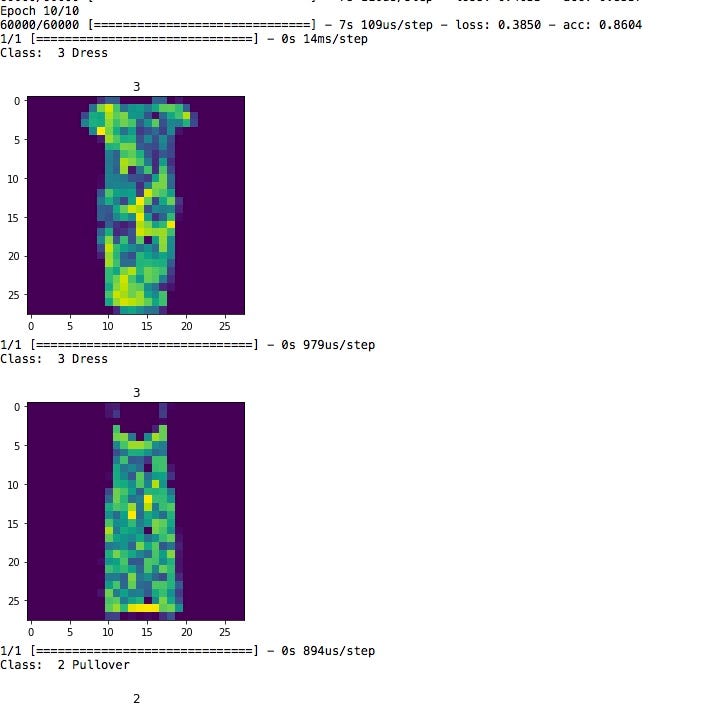
Once this is created, compiled and run, you should hopefully have output like this — (1) watch the epochs run and get some accuracy and loss figures, and (2) see some sample images and predictions like this:


(1) Output from pltimshow — section 9
(2) More output from pltimshow in Section 9 — image and prediction

It is good to see some samples and predictions paired with the images, as these programs can get complicated as they scale up. Visualizing makes it easier to understand, I think. I broke the code into snippets for better explanations.
This article is posted on here on Medium as well

Wednesday, February 21, 2018

AI in business - Costs, Benefits, Risks and Opportunities - example for small business


Artificial Intelligence (AI) is the new hype of today's digital world. Except, it really isn't - for this key reason: it adds value.  That is what essentially business and capitalism are about - taking inputs, adding value and selling the value added goods or services for a higher price and making a profit in the difference between the cost and price.
Beyond the headlines and buzzwords, though, are some developments that will upend the way we think of work, and business - from getting quotes for a home roofing project to how work itself gets done.  The key question is, at what cost? should businesses rush into AI, or step into it incrementally?
Depending on the size of the business, the industry and competitors, it may be one or the other.  For smaller businesses, an incremental process may be a good way to gauge the promise, pain and profits of the new ways.
Smaller businesses do not have the capital to spend large funds.  But the good news is that off the shelf commercial software, combined with vast data processing ability at low scalable costs (through cloud) are leveling the field.  Likewise, talent is getting more widespread - regardless of what one might hear about an AI talent shortage at the high end (that's Google and Uber fighting over self driving cars and such).  
Here is an example of data analysis and prediction of new roofing prospects in a medium sized suburb (50,000+homes) for a roofing firm, whose primary business is replacing old roofs on homes and smaller commercial establishments. 
Expertise to create an AI modeled marketing campaign is easy and getting easier by the month.  Thousands of aspiring data scientists, including college students, free-lancers, mid-career employees who have some data analytics knowledge and are eager to apply their skills - many of whom may do it for a small fee or even for free (in exchange for your data and a plug on LinkedIn or a recommendation).  Many of these practitioners will probably use their own hosting or infrastructure resources.
Here's the value proposition - as opposed to more traditional methods, this is a possible scenario of how an AI inspired campaign might look like.
- Get satellite imagery of the town from commercial satellite imagery or existing free database if available.
- Use database file to filter out new homes, government properties and commercial grade properties that need to be excluded (flat concrete roofs, for example).
- Use image recognition and CNN (Convoluted Neural Network) processing to determine which roofs  are in deteriorated condition.
- Use calculation of roof size (from image database) to estimate effort - roofing materials, labor, time to completion).
- Use property records to get owner details.
- Use more detailed databases to exclude properties in receivership (foreclosed properties).
- Use township public records to exclude properties that are abandoned, with tax liens etc.
- Send digital marketing offers to targeted lists.
- Physical flyers to targeted lists with discounts and financing offers.
- Joint marketing prospects with local bank branches (for financing and home equity loans).
- Joint marketing prospects with local real estate firms.
- Project end date (to close out campaign, tally costs and new clients) and season related end of activity (for example, in Northern areas, middle of Fall).

A post-completion analysis would, of course, ask these questions:
  • How many new clients resulted from the campaign? 
  • Was it more or less than similar sized "older" campaigns (flyers, commercials) from the past?
  • Once you factor out seasonal factors, was it worth it?
  • Cost-benefit analysis
In the near future, these questions will become moot as almost all marketing campaigns will be done in the new digital AI way.  Until then, the value proposition will have to be tested through 'get your feet wet' smaller initiatives.

Wednesday, January 17, 2018

Value proposition of Artificial Intelligence (AI) for IT areas

AI is great for most business areas within companies.  It promises new insight, prediction, analysis - which allows firms to target their most promising prospects in sales, most troublesome (and prospective profitability) customers, and links current data with future expansion.  
Well, that's great for the business units, and for Sales and Marketing, and for Finance, and even for Operations.  Primarily, IT focuses on "what to analyze, how to analyze and provide output that is meaningful to the business".  The business then asks "How can I apply this insight to make better decisions and for direction in both tactics and strategy".
We all know about Amazon's use of AI, to use a well-known example, about customer product recommendations, or Netflix's movie recommendations.  A more complex variation of this would be Walmart's predictive analytics team using AI to anticipate best price points for new products.
How about IT? is it simply a means to an end, a tactical vehicle for a strategic roadway?
The answer, of course, is no.  Beyond the obvious - that IT, as generally used, is the tool for designing, implementing and reaping the benefits of AI, IT itself could use AI.  How so? here are some possibilities:
- Infrastructure:   AI can be used for IT asset management. How many laptops and PCs broke down in the the past 5 years? use predictive analytics to find out possible future costs, by department, region, function, job title and even time of year (perhaps the after-parties in December are a little too, er, wild).  Similarly, Software assets - licenses, subscriptions to software and data services - can be analyzed to find out rate of use, peak usage vs. license costs and predictive cost management and demand.
- Operations: Already in wide use at call centers and tech support areas, AI includes staffing, chat bots,.  Now, with increasing use of Amazon Alexa, Google Home and other audible assistants, users can resolve their issues without human contact in most cases.  This does not mean that humans are not needed - in fact, quite the contrary - the call center / tech support personnel's valuable time can be spent solving higher level issues, instead of "my shared drive connection is lost" type simpler issues.
Other potential functions include speaking to a device and asking, in plain English (or other language) for requests such as "Please give me a report of all cost centers with expense ratios higher than 15% from January through June of this year".  
- Research / Investigation - IT Operations, Systems Management, Compliance:  Much of workers' time is taken up by looking for and researching something - why something was or wasn't done, why it took so long, or how something connects to something else.  AI could help, by using neural networks to sift through data, and by analyzing past data streams, to come up with potential explanations.  Examples include "Why was the invoice rejected?" to "Why did the product specs have another layer of safety features after approval by Compliance?"
Constant analysis of vast streams of data on just about every function, task, process, policy, project, and mandate might sound like a vast headache; but used properly, it will alleviate many bottlenecks in process and operations, and produce cost savings and open up new ways of looking at, and doing things to increase productivity.  The devil is in the details though - and as the age of AI opens up at a head-spinning pace, prepare to learn about it, use it and stay ahead of the game.  
Project Charter / Design / Approval / Funding / Implementation / Oversight / Completion:  Projects involve a number of people, policies and process in large firms.  AI is currently used to automate some of these steps, with the potential to automate many more steps in the near future.  The idea is not simply to have a workflow process automation, but use intelligent programs to probe the cost benefit and burn rate areas and predict the final run rate and project completion time and budget.  Not to worry, if you are a project manager - the knowledge you have built up will be needed by any automation team.  Are you killing your own future? No - your expertise will propel you to higher value-add processes, so you can spend your time analyzing the project from a higher perspective instead of worrying whether functional testing can start before any project milestone prerequisite is done.
If you don't know where to start, there are several online courses that explain AI in greater detail. If you are interested in the business implications, select, from one of the many offerings from any of these online education providers.  Many of the courses are free, others might have a marginal fee.
Note that many colleges also have online classes, some of which may be free - or not.  Check Cornell, MIT, Stanford etc. 
Some of these providers are:

Hope this gets you thinking of how you can contribute to your business' IT area.

Friday, September 30, 2011

Project Cost Management and Budgeting-Tedious but Important

Project Cost Management is, to far too many managers, a misunderstood and mysterious process. However, it is a major component of successful projects and one of the major triads of project management - the other two being scope and time management. What are the major parts of a good project budget and how does one go about creating (and later, adhering to) a project budget? My post here deals with technology related projects, but the principles can be applied to other kinds of projects as well.

First, as you probably guessed, is to understand not only what the project's goals are, but also the context - the company environment. If costs are allocated and charged a certain way, then it is important to follow that process. For example, if the corporate policy is to charge back software licenses to individual projects (or to pro-rate them) versus an enterprise license that allows unlimited installations/implementations, then that should be taken into account.

Secondly, what is the project's scope - for example, in a hosting (infrastructure) area that I worked in, any project entailed hardware, software and service costs - hardware was the servers and network costs charged to the businesses that used them (or were responsible for them) and software costs included development, testing and licenses for other software used to make the applications work (middleware, for example, and special security software as well). Services included monitoring software that was maintained and monitored by other vendors and groups, for which we paid a fee.

Another point is to distinguish between one-time and recurring fees. For example, procuring hardware (servers, Hardware Security Modules - HSMs, network gear etc) were usually a one-time fee. However, maintenance costs, licensing and service fees to keep that hardware running - these were recurring costs. 

Then the software portion of the project budget was created - after discussions with solutions architects, development team leads and software architects, I arrived at an estimate of how long the software solution ("application", "program", "code" etc) would take, and the average hourly cost per resource (this is normally used corporation wide - if not, you can easily get estimates from various sources).  For example, our hourly resource estimate was $125 (this is not what people get paid, but rather, an average of the cost per resource per hour that included major supporting components). Multiplied by the number of hours for the component, you get a software total, which is then added to any procured components. 

Other components include services - Monitoring, moving, testing, assembly, security (physical/virtual) or anything else that is of a service related nature that won't be included in hardware or software.

My budget for the project, which were presented to the project sponsor (business managers) provided a total budget, which was then broken down by one-time and recurring costs, which were spread over hardware, software and services.

Once the budget was presented, the review began. Frequently as more details were presented, the budget was changed - we went from an initial ("Level 3") budget to a more detailed version ("Level 2") and finally to a lock down version ("Level 0") as the project was formally approved and implementation began.

What about variables? This usually present the greatest hurdles to successful project cost management, and entire books and journals are filled with details on how to deal with them. Basically, there is no one answer - the idea is to drill down as much as possible and get details on what and how some process gets done. Then a reserve - a rainy day fund, if you will - is added. Some project managers get too tempted here, to add a very large reserve so that they have enough of a buffer - but the project then starts to look absurdly expensive, and can quickly be rejected if the project sponsors start asking questions ("how come XYZ team implemented a similar project for 30% less?").  

Risk Management is connected to cost management - a good grasp of a project's risks means a realistic and potentially successful project. However, from sudden increases in hardware costs to unforeseen failure in software processes, technology projects are littered with cost overruns. This is especially true for new and untried processes. Many development methodologies exist to lower these risks; however, they must adhere to, and align with, the corporate standards as applicable. 

If after laboring through the above processes, you arrive at a budget, only to have the project sponsors declare it is too high, then there are ways to lower them - keep the alternatives handy and well researched before these budget meetings. For example, if new hardware for a project is too expensive, find out if existing hardware can be shared - for example, servers can use virtualization technology to host many applications.  Network gear can be shared in certain situations as well.  For applications that are not mission critical, backup hardware can be shared as well. Furthermore, backup resources in a different data center can be used to do load-balancing (what that means is that instead of sitting idle waiting to be activated in case of a disaster, they can service some of the "live" or active traffic for web applications through load balancers etc).

Software processes can be outsourced - if it isn't already. If it is, and you still find it high, ask for a waiver from the approved vendors for your firm, so you can ask for competitive bids outside of the normal vendor pool for your firm. If that is not possible or feasible, do a detailed analysis (with the software team leads and architects) at the work breakdown structure for the software - which processes are taking the most resources? can some of them be pared down? can any process be "lifted" (copied or re-used) from any other recent project? For example, many applications use the same reporting engine - are there similar reports for other applications out there, that, with a little tweaking, be used in your project? or can a user-defined reporting system be installed where the end user can drag and drop fields and create customized reports so that a fully pre-defined reporting menu is not necessary?

Services too must be looked at carefully for hidden savings. Sometimes you may find other departments in your firm using the same service - in which case you can ask the vendor for a discount, or if the other  areas have unused licenses or user credits, ask if you can use them. The same goes for monitoring solutions, security systems, control and risk management and on and on.

Many of the budget processes outlined here follow the same theme: Get an idea of the costs involved in building your project and then drill down to each piece and identify and price them. Leave a buffer for unexpected items, with the caveat to resist the temptation to make the buffer too large. And once the project is over, go over the budget versus actuals and identify the lessons learnt, and then you will be on to your next project, a bit wiser.


Monday, December 6, 2010

Business Analyst Careers - is Industry Experience more important than Analytical Skill?

Business Analysts often delve into business requirements, gathering, understanding and documenting business processes and functions. An analytical mind and detailed information gathering are considered to be essential; one wonders though, if industry experience is a must for good business analysis skills. After all, if you knew well the ins and outs of the industry you were in, that’s good, right? The answer is probably, but not always. Why is that?
First, industry experience means less time is wasted knowing the industry environment – the general models the business follows, what regulatory and competitive arena it is part of and some common terminology. Secondly, business process flows are easier to understand, say, if one was documenting business process flows for a financial transaction, if that person had already worked in a financial services firm in a financial transaction environment (e.g., Front office, where the deals were made, or the middle office, where financial and regulatory processes were checked or filtered, and the back office, where the transactions were processed and settled – and where exceptions were followed up for closure).
That of course, brings up an interesting question – if a business analyst goes into an unfamiliar environment, how much time should be spent learning the business environment? Wouldn’t that leave less time for focusing on the essentials of requirements, elicitations and documentation? And how valuable would all that be, anyway? After all, time is money – and with workloads being what they these days, such knowledge, while good for a progressive and open mind, would be quite expensive indeed, wouldn’t it?
The answer is that depending on the timeframe, it would be beneficial to get the most important work done first, which would mean skipping the overview on the business. In a limited time frame, a “bullet-point” information dissemination method (summary) might work. Asking questions in the right environment is healthy, but learning important concepts on one’s own time is a better idea. After all, stakeholders have limited time available even for requirements – they might not have the patience for an extended basics class. On the other hand, workflows and the reasoning behind them should be questioned to extract the maximum value for optimization and better business.
What about the times when it might be beneficial to hire a business analyst who is sharp and curious, but not industry-knowledgeable? When the existing patterns are so constricted and “inside the box” that a fresh perspective is needed, hiring analysts without a lot of presumptions and insider’s knowledge is actually a good idea.
I worked in a firm once where I was asked to interview, evaluate and recommend IT candidates (mostly developers, some analysts). At the end of the face-to-face interview, I would ask the candidate to solve a problem on pen and paper. The rules were clear – no writing code, simply writing out the solutions – a diagram was acceptable as long as it wasn’t too complex. Additionally, the answer had to be limited to 1 page and be completed in about 30 minutes.  I was amazed at how the smartest candidates failed this written “test” – it was actually quite simple, for it did not require deep industry knowledge and did not put the candidate on the spot by testing coding knowledge. I simply wanted to know how the candidate thought about solving problems and whether he/she was able to put it on paper. I often got several pages of answers, written code and requests for extending the time available, though all the requirements for the written test were explained before hand. Needless to say, these candidates were not hired.
Business analysts, like developers and solution architects, are trained to think logically and focus on specific issues at hand. Once in a while, though, they need to step back, and like a painter evaluating and assessing his painting-in-progress, assess their progress on the task at hand and be prepared to explain it to a wider audience in plain talk. That, in my opinion, is an essential skill of the modern analyst.

Tuesday, November 23, 2010

Secure Hosted systems - a primer

What are secure systems? Basically, as per Information technology best practices, Hosted systems are secured to minimize unauthorized access and possible tampering. Most people already know about server rooms (or data centers in larger organizations) allowing card-swipe only access with approved permit, escorted by personnel, limited access etc.
How about virtual access? To begin with, the systems should be built (I don’t mean physically built, but initialized or configured by the Systems Administrator – “build” is a common terminology in infrastructure areas for this process). There should be a SOP (Standard Operating Procedure) for building a server in a networked environment – and it should list all the must-have packages or software that the system must, at a minimum. These include basic I/O limited access, anti-virus and malware prevention, and limited or no insecure services (FTP, RSH in Unix systems) etc.  Depending on the type of server being built (Web, database, application, middleware or other), special packages may be installed – for example, Tectia SSH package software might be installed on web servers to prevent user passwords from being communicated in clear text – in case the network and/or host is compromised, passwords in clear text could then be easily stolen and misused to cause much wider damage than the initial hacking.
Additionally, a checklist is often used to ensure that all the above mentioned processes were completed successfully and is signed and dated, either on a paper or electronic copy – these are considered official documents and may be requested (demanded?) from auditors.
Hosts (servers) should also ensure that access is limited to complete specific tasks by authorized personnel (and access through a configuration management system should require a request with complete details and approval by a manager and another group, say, Change control). Universal access (such as World writeable files and directories) should either not be allowed or kept to a minimum.
Functional IDs (“DB operator”, “SysAdmin1” etc) should also be allowed minimally or not at all as they cause tracking and auditing issues (“DB Operator” is much harder to track than “JSmith”).
Server logs should also be available, confidential and have data integrity – that is, not corrupted or incomplete – to the greatest extent possible. This is part of the “Confidentiality, Integrity, Availability” mantra of IT best practices. Log backup and retention and retrieval should conform to regulatory and corporate standards as well (here’s a question – how often are log backups tested – that is, retrieved and checked for completeness – other than during an audit?).
Developers’ access to production servers or data (known as DAP) is another area with conflicting demands. Security and Compliance policy generally dictates that developers not be able to access production data; but in the real world, developers are also in the line of support – often times, they may be the first level of support, especially if the application in question is very complex and is not established. Furthermore, the various levels of support may not have the in-depth expertise required to solve some urgent production problems. Anticipating this, an “emergency access to production” policy should be ready – at the least it should specify:
·         The process for obtaining emergency access to production servers, data and logs
·         Approval process (be realistic – if a developer offshore needs a senior manager’s approval at 4 am EST, what does he do?)
·         Specific, time-bound parameters – access to say, production server DBPROD1 will last from time approved for 4 hours” and be limited to view only specific areas (e.g., “\app\bin\userlogs\”).
·         Follow-up – once the issue has been resolved, follow-up communications and resolution items should be done by the owner of the process in question.
One note – the process above should generally try to avoid listing specific people’s names or contact numbers as these might change frequently – instead, a  more useful email distribution list with a descriptive name such as “Emergency approvers for brokerage app 1” might work better.
Another issue dealing with privacy and data segregation is that developers often need access to huge volumes of real-world data to test various scenarios and parameters in their apps. To do so, they sometimes take production data (e.g., last week’s brokerage transaction master file). This is considered a breach of privacy as well as frowned upon by Auditors – a malevolent developer might take a real user’s details and possibly misuse it or send it to a friend outside the firm.  Enter the ETL (Extract, Transform, Load) software – otherwise known as “data obfuscation” software. This would take all the data in a specified data file, and fudge the details so that real names, SSNs, and account numbers are masked by made-up data.  This might be more suitable to larger organizations – the cost and complexity of enterprise level ETL software is high. Cheaper alternatives are also on the market though, and are getting better.

As networked systems grow more complex, they grow more vulnerable to mistakes and misuse - and the points above are a starting point for securing them.